Javadoc Reader Lite1.3
Publisher Description
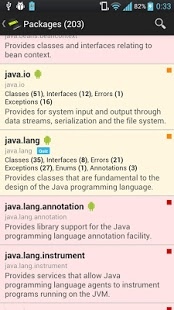
Javadoc Reader is an application to comfortable browse and read javadoc documentation. It can connect via http or https protocol, download and parse documentation. It can also parse javadoc from local filesystem. It has built in interface to connect with such javadoc as:
- Java 6 SE
- Java 7 SE
- Hibernate
- Spring
- Appengine
- Objectify
- Java 6 EE
- Lucene
- JAXB
- Gson
- Many Google API
- and more...
It can connect with custom address as well, so you can browse your own javadoc with nice and handy user interface.
Lite version have some restrictions which disappear if you buy full version of application.
Javadoc Reader features:
- Browse and read javadoc documentations (only Java 6 SE and one custom javadoc in lite version),
- Add javadoc from local filesystem,
- Check which packages belongs to Android library,
- Search among classes, interfaces, enums, exceptions, errors, annotations, methods, constructors and fields,
- Bookmark elements to have fast access to them (only two bookmarks in lite version),
- Ability to generate PDF reports from package members (full version only),
- Fast way to go to superclasses (full version only),
- References window with fast way to go to parameters types, implemented interfaces, throwable and return types (full version only),
- Simple quiz "in which package that class is",
This application is handy reader for all java developers but it may help for example to prepare for IT interview as well.
About Javadoc Reader Lite
The company that develops Javadoc Reader Lite is Krinsen. The latest version released by its developer is 1.3. This app was rated by 1 users of our site and has an average rating of 5.0.
To install Javadoc Reader Lite on your Android device, just click the green Continue To App button above to start the installation process. The app is listed on our website since 2013-02-20 and was downloaded 7 times. We have already checked if the download link is safe, however for your own protection we recommend that you scan the downloaded app with your antivirus. Your antivirus may detect the Javadoc Reader Lite as malware as malware if the download link to com.krinsen.javadocreader is broken.
How to install Javadoc Reader Lite on your Android device:
- Click on the Continue To App button on our website. This will redirect you to Google Play.
- Once the Javadoc Reader Lite is shown in the Google Play listing of your Android device, you can start its download and installation. Tap on the Install button located below the search bar and to the right of the app icon.
- A pop-up window with the permissions required by Javadoc Reader Lite will be shown. Click on Accept to continue the process.
- Javadoc Reader Lite will be downloaded onto your device, displaying a progress. Once the download completes, the installation will start and you'll get a notification after the installation is finished.
Program Details
System requirements
Download information
Pricing
Version History
version 1.3
posted on 2013-02-20
Several fixes and updates
version 1.3
posted on 2013-02-20
FastScrolling enabled in package details,,Ability to generate PDF reports about package members (pro version only),,Stability fixes,,Fixed translations.
